
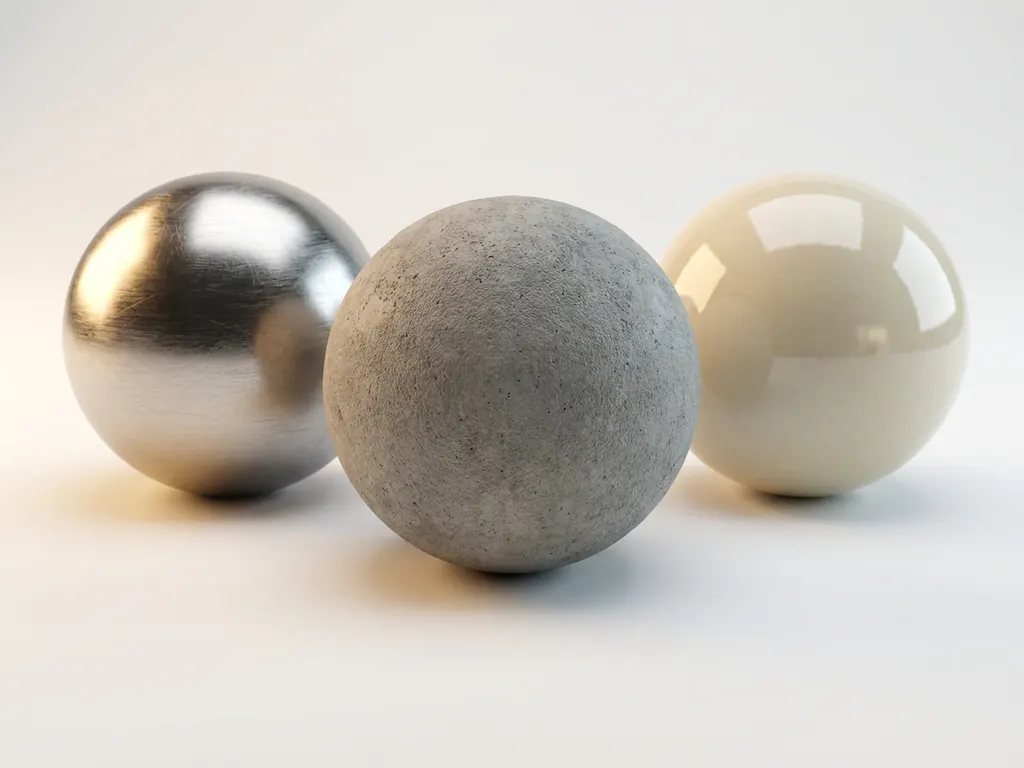
A PBR material — short for Physically Based Rendering material — is a digital surface definition built on real-world physics. By this PBR definition, every surface property (color, reflectivity, roughness) is grounded in measurable physical data rather than artistic guesswork. PBR materials use scientific principles — including energy conservation, microstructure simulation, and physically accurate reflection models — to create surfaces that respond to lighting conditions exactly as their real-world counterparts do.
For brands competing on visual quality, this distinction is decisive. PBR materials are the difference between product imagery that converts and imagery that erodes trust. Whether you manage a luxury goods catalog, a premium furniture range, or a high-end consumer electronics line, PBR is the technical foundation that makes your digital products look as compelling as the physical objects they represent. This article covers everything from the core technical principles to the full implementation workflow — and explains how we at 3Dimerce deliver this expertise for design-driven brands.
Why are inconsistent product visuals costing you customer trust?
When digital product presentations don’t match reality, customers notice immediately. Traditional rendering methods often produce surfaces that look artificial under different lighting conditions, creating a disconnect between what customers see online and what they expect to receive. This inconsistency erodes trust at the critical moment when purchasing decisions are made. Research consistently shows that visual quality directly impacts conversion rates, with poor or unrealistic product imagery driving potential customers to competitors who present their products more convincingly.
The solution lies in adopting rendering standards that mirror real-world physics. By implementing PBR (Physically Based Rendering) workflows, brands can ensure their digital products maintain visual consistency across all lighting scenarios — building the confidence customers need to complete purchases.
What does flat, lifeless product imagery signal about your brand positioning?
Products that appear dull or artificial in digital environments send an unintended message about quality and attention to detail. When surfaces lack the subtle imperfections, natural wear patterns, and authentic material properties that customers expect, your brand appears disconnected from the premium positioning you’ve worked to establish. This is particularly damaging for design-led manufacturers and luxury brands, where material authenticity forms the foundation of customer perception.
The path forward involves embracing material definition systems that capture the full complexity of real surfaces. This means moving beyond basic color and bump maps to comprehensive material systems that account for how different materials absorb, reflect, and scatter light naturally.
Visual Commerce Solutions
Talk to our team about your project.
What is a PBR material and why does it matter?
A PBR material (Physically Based Rendering material) is a comprehensive digital description of how a surface interacts with light, based on real-world physics rather than artistic approximation. The term “physically based” refers to the mathematical models that govern how light behaves when it strikes different materials — from the way metal reflects light differently than fabric, to how surface roughness affects the clarity of reflections.
PBR materials matter because they provide consistency across different viewing conditions and rendering engines. When a material is defined using PBR principles, it will look correct whether viewed under bright daylight, warm indoor lighting, or any other illumination scenario. This lighting-independent consistency is crucial for brands that need their products to appear authentic across multiple platforms and environments.
PBR also enables more efficient workflows. Instead of creating separate material setups for different lighting conditions, artists create one PBR material that adapts automatically to any environment. This scalability is particularly valuable when managing extensive product catalogs or multiple configuration options.
- Cross-environment consistency: A single PBR material looks accurate under any lighting condition or rendering engine, eliminating the need for scene-specific material variants.
- Workflow scalability: One material definition covers all platforms and configurations, dramatically reducing production time across large product catalogs.
- Brand authenticity: Surfaces grounded in measurable physical data communicate quality and attention to detail — reinforcing the premium positioning your brand has earned.
How do PBR materials create realistic surfaces?
PBR materials achieve realism through a systematic approach to light simulation that mirrors natural physics. All materials interact with light in predictable ways: they absorb certain wavelengths, reflect others, and scatter light based on their microscopic surface structure. PBR captures these behaviors using measurable physical properties rather than manual artistic adjustments.
- Energy conservation: PBR ensures a surface can never reflect more light than it receives, eliminating the unnaturally bright surfaces common in traditional rendering. When light hits a PBR material, the system calculates exactly how much energy is reflected, absorbed, or transmitted based on the material’s physical properties.
- Microstructure simulation: PBR materials account for microscopic bumps, scratches, and irregularities that affect how light scatters. A polished metal surface produces sharp, clear reflections because its microstructure is uniform, while brushed metal creates elongated reflections due to its directional surface pattern — these subtle differences are what make PBR materials appear convincingly real.
- Reflection type separation: Metals primarily exhibit specular reflection, creating mirror-like surfaces, while non-metals combine both diffuse and specular reflection in varying proportions. PBR materials automatically balance these reflection types based on the material’s inherent properties, eliminating the guesswork that often leads to unrealistic results.
What are the different types of PBR texture maps?
PBR materials are built from several specialized texture maps, each controlling a specific aspect of surface appearance. Understanding each map’s role is essential for creating accurate, consistent materials.
- Albedo map: Defines the base color of the material without any lighting information. It represents the pure color visible under perfectly even, white light and must never contain shadows, highlights, or lighting effects that would interfere with PBR calculations.
- Metallic map: Distinguishes between metallic and non-metallic surfaces using black (non-metal) and white (metal) values. Gray values are generally avoided, as they represent physically unrealistic hybrid materials.
- Roughness map: Controls surface smoothness. Black represents perfectly smooth surfaces; white indicates maximum roughness. This map determines whether a material appears polished, brushed, worn, or textured, and typically has the most dramatic visual impact on reflection clarity.
- Normal map: Simulates surface detail — bumps, scratches, and small irregularities — without adding geometric complexity. Color information encodes surface direction, allowing the renderer to simulate fine detail while maintaining efficient performance.
- Ambient occlusion map: Adds subtle shadowing in surface crevices, deepening the perception of surface depth and contact between parts.
- Height map: Provides actual geometric displacement for more pronounced surface features, going beyond the visual simulation of normal maps.
- Subsurface scattering map: Controls how light penetrates translucent materials such as skin, wax, or certain plastics, where light visibly travels beneath the surface before exiting.
What PBR formats and technical standards should you know?
Understanding PBR format standards is essential for anyone deploying PBR materials across platforms. Two dominant workflow standards define how material properties are encoded, and a handful of file formats determine how those materials are stored, shared, and rendered. Choosing the right PBR format from the outset prevents costly rework and ensures your materials perform correctly across every target environment.
PBR workflow standards: Metallic-Roughness vs. Specular-Glossiness
The Metallic-Roughness workflow is the current industry default, adopted by GLTF/GLB, Unreal Engine, Unity, and most modern real-time and offline renderers. It defines surfaces using an albedo map, a metallic map, and a roughness map — a streamlined set of inputs that maps cleanly to physical material properties. The Specular-Glossiness workflow is an older alternative that defines surfaces through a diffuse color map and a specular color map combined with a glossiness map; it offers more artistic control in some legacy pipelines but is less physically grounded and increasingly unsupported in new tools. For any new PBR project — whether targeting interactive configurators, AR, or high-end offline rendering — Metallic-Roughness is the recommended standard.
Common PBR file formats and export settings
Selecting the right PBR image format and container is as important as the workflow itself. The following formats cover the majority of professional use cases:
- GLB / GLTF: The open standard for PBR material exchange across web, AR, and real-time engines. GLB is the binary container version of GLTF and is the preferred PBR format for e-commerce configurators, WebGL viewers, and AR platforms such as Apple AR Quick Look.
- USD / USDZ: Pixar’s Universal Scene Description format, with USDZ as its packaged variant for iOS AR. USD supports full PBR material definitions and is increasingly used in high-end production pipelines and Apple ecosystem deployments.
- SBSAR: Adobe Substance’s procedural material format, which stores the full material generation logic rather than baked textures. SBSAR files are ideal for parameterized materials where color, roughness, or surface variation needs to be adjusted at runtime without re-exporting texture maps.
A practical note on color space: albedo and ambient occlusion maps should always be stored in sRGB color space, while metallic, roughness, and normal maps must use linear color space. Incorrect color space assignments are one of the most common sources of inaccurate PBR rendering, particularly when moving assets between tools. For texture resolution, 2K (2048×2048) is generally sufficient for web and interactive use, while 4K (4096×4096) is the standard for high-end visualization and print-quality output.
How do PBR materials work in real-time engines and games?
Modern PBR standards were originally developed for real-time use in games and interactive applications before becoming the universal standard across all 3D disciplines. The need to render physically accurate surfaces at interactive frame rates drove the development of the efficient Metallic-Roughness workflow that now underpins virtually every major rendering pipeline. This shared origin means the same PBR material assets can power both real-time interactive experiences and high-fidelity offline renders — a significant practical advantage for brands that need materials to perform across multiple output channels.
PBR in game development
Game engines such as Unreal Engine and Unity implement PBR through dedicated material editors that expose the full Metallic-Roughness parameter set. Artists build materials directly within the engine’s node-based editor, connecting texture maps to the appropriate inputs and previewing results in real time under dynamic lighting. PBR in games enables environments and characters to respond convincingly to any lighting scenario the player encounters — the same physical accuracy that makes a product configurator trustworthy makes a game world believable. Loading PBR assets into modern engines is straightforward: GLTF/GLB files import with all material channels intact, and both Unreal and Unity support direct PBR material import with minimal manual setup.
PBR for interactive product configurators and AR
The same material pipeline that powers PBR in games directly enables e-commerce product configurators and augmented reality try-on experiences. A PBR material library built to GLTF standards can be deployed in a WebGL configurator, exported as USDZ for iOS AR, and rendered offline for catalog imagery — all from a single source of truth. This cross-environment capability is particularly valuable for luxury and design brands, where customers expect the product to look identical whether they’re viewing it on a product page, inside an AR experience on their phone, or in a printed lookbook. We build PBR material libraries optimized for both real-time and offline rendering pipelines, ensuring your assets perform at the highest level across every channel.
What’s the difference between PBR and traditional materials?
The core difference is that traditional material systems rely on artistic approximation, while PBR materials use standardized workflows based on measurable physical properties.
| Criterion | Traditional Materials | PBR Materials |
|---|---|---|
| Lighting consistency | Breaks under changing light conditions | Physically accurate under any lighting |
| Workflow efficiency | Requires scene-specific manual tweaking | One material adapts to all environments |
| Realism | Relies on artistic approximation | Grounded in measurable physical data |
| Scalability across platforms | Separate setups needed per platform | Single asset works across all platforms |
| Iteration time | High — each lighting change requires rework | Low — material is correct from first application |
| Cross-environment accuracy | Accurate only under original design conditions | Consistent across all viewing environments |
Traditional materials combine diffuse, specular, and reflection maps through trial and error, adjusted until the result looks acceptable under specific lighting conditions. This approach breaks down when lighting changes, often requiring entirely separate material setups for different environments. PBR materials, by contrast, use scientifically accurate values that correspond to real-world materials — a PBR gold material, for example, uses reflectance values measured from physical gold, ensuring consistent appearance regardless of lighting.
Quality consistency is the most important practical distinction. Traditional materials may look correct under the specific conditions they were designed for but appear wrong when lighting changes. PBR materials maintain visual accuracy across all lighting scenarios, making them the standard for product visualization where items must look convincing across varied viewing conditions.
What is the business impact of PBR materials on product sales?
The commercial case for PBR adoption is well-supported by patterns observed across e-commerce and digital retail. Industry research in visual merchandising consistently links higher-fidelity product imagery to measurable improvements in conversion rates — with high-quality 3D product visuals reported to increase conversion rates significantly compared to standard photography, particularly for products where material texture, finish, and color accuracy are central to the purchase decision. For design-driven brands and luxury retailers, where a customer’s confidence in the product’s appearance directly determines whether they buy, the quality of your material rendering is not a production detail — it is a revenue driver.
The business outcomes of PBR adoption fall into three categories that matter to decision-makers evaluating the investment:
- Higher conversion rates: Photorealistic PBR imagery gives customers the visual confidence to complete purchases, particularly for high-consideration items where material quality is a primary selection criterion.
- Reduced product return rates: Accurate material representation closes the gap between customer expectation and physical product, directly reducing returns driven by appearance mismatch — one of the most costly problems in e-commerce fulfillment.
- Faster catalog production cycles: Reusable PBR material libraries dramatically reduce the time and cost of producing imagery for new product launches, color variants, and seasonal updates, replacing repeated photography sessions with rapid digital configuration.
We work with design-driven brands and premium manufacturers to deliver exactly these outcomes — combining the technical precision of PBR with the commercial understanding of what high-end product visualization needs to achieve.
How do you create effective PBR materials for products?
Creating effective PBR materials for product visualization follows a repeatable process that prioritizes physical accuracy at every stage. The steps below represent the workflow we execute for every client project — from initial reference collection through to a fully organized, deployment-ready material library.
Step 1: Gather physical reference material. High-quality photographs of the actual material under controlled, even lighting provide the foundation for digital recreation. References should capture color, surface texture, and reflection characteristics without environmental lighting that could mislead the creation process. Physical samples are always preferable to photography alone, as they allow direct measurement of surface properties.
Step 2: Create a lighting-neutral albedo map. Any shadows, highlights, or color casts from environmental lighting must be removed so the base color accurately represents the material’s inherent properties. Professional material scanning captures this directly; skilled artists can also extract clean albedo information from properly lit reference photography using calibrated color workflows.
Step 3: Build roughness and metallic maps from surface analysis. Smooth areas map to dark roughness values; textured or worn areas map to lighter values. The key is observing how light reflects off different parts of the reference material and translating those observations into grayscale values that control reflection blur. Metallic maps use pure black for non-metals and pure white for metals — gray values indicate physically unrealistic hybrid states and should be avoided.
Step 4: Generate normal and additional detail maps. Normal maps encode fine surface detail — stitching, grain, micro-scratches — without adding geometric complexity, keeping the asset efficient for real-time use. Where more pronounced displacement is required, height maps provide actual geometric offset. For materials such as leather, fabric, or certain woods, subsurface scattering maps capture how light penetrates and exits the surface.
Step 5: Test across multiple lighting environments. A correctly built PBR material should look convincing under bright daylight, warm indoor lighting, and dramatic directional lighting without any adjustments. Cross-environment testing is where loading PBR assets into real-time engines such as Unreal Engine or Unity becomes essential — it reveals issues that single-condition testing misses and validates that the material will perform correctly in every deployment context.
Step 6: Organize and integrate into a product material library. For product visualization applications, material libraries should group similar materials together with naming conventions that clearly indicate material properties, streamlining selection during product configuration. A well-structured library also accelerates PBR development for future product launches, as existing validated materials can be adapted rather than rebuilt from scratch.
This six-step workflow is precisely what we execute for every client engagement. It is the process that ensures the materials we deliver perform at the highest level — whether in a real-time configurator, an AR experience, or a high-end offline render.
How 3Dimerce helps with PBR material implementation
We specialize in creating photorealistic PBR materials that bring products to life across digital platforms. Our approach combines scientific accuracy with artistic excellence, ensuring every surface responds to light exactly as customers expect. Through our comprehensive visualization platform, brands can showcase their products with stunning, true-to-life realism while maintaining blazing-fast performance — purpose-built for the design, luxury, and high-end market where material authenticity is non-negotiable.
Our PBR material development process
Every project we undertake follows a structured four-phase process designed to deliver materials that are both technically precise and commercially effective:
- Material audit and reference collection: We begin by reviewing your existing assets and collecting physical samples or reference photography. This phase establishes the ground truth for every material we create and identifies any gaps that need to be addressed before production begins.
- Production and quality review: Our team creates the full PBR material set — albedo, metallic, roughness, normal, and any additional maps required — with iterative quality review against physical references at each stage. Every material is validated against measured physical values, not visual approximation.
- Cross-environment testing: Completed materials are tested across all target rendering environments, including real-time engines, offline renderers, and AR platforms. This ensures consistent appearance regardless of where the material is ultimately deployed.
- Final delivery with organized material library: We deliver a fully structured material library with clear naming conventions, documentation, and integration support — ready for immediate use in your product configuration, e-commerce, or marketing workflows.
Our PBR material services include:
- Scientifically accurate material recreation from physical samples
- Comprehensive material libraries optimized for product configuration
- Cross-platform compatibility ensuring consistent appearance
- Real-time rendering optimization for interactive experiences
- Seamless integration with existing product catalogs
Trusted by design-driven brands
We work exclusively in the design, luxury, and high-end market — the segment where material quality is inseparable from brand value. Our clients include premium furniture manufacturers, luxury goods brands, and high-end consumer electronics companies that require PBR material libraries at catalog scale, built to the exacting standards their customers expect. The outcomes they achieve are consistent: stronger conversion performance, measurably fewer returns, and the ability to launch new products and color variants faster than their competitors. When material authenticity is non-negotiable, we are the partner brands trust to deliver it.
Ready to transform your product visualization with photorealistic PBR materials? Contact our team to discover how our expertise in high-end material creation can elevate your brand’s digital presence and drive customer engagement.
Where are PBR materials used? Industry applications and product types
PBR materials deliver their greatest impact in industries where material appearance is central to the product’s value proposition — where a customer’s perception of quality, craftsmanship, or authenticity is formed almost entirely by how a surface looks and behaves under light. Across the sectors below, PBR resolves the specific rendering challenges that traditional materials cannot adequately address.
Luxury goods and jewelry
Jewelry presents one of the most demanding challenges in product visualization: capturing the complex interplay of light on faceted gemstones, polished metals, and delicate surface finishes simultaneously. Traditional rendering struggles to reproduce the way light refracts through a diamond or the subtle difference between 18-karat yellow gold and rose gold under warm versus cool lighting. PBR’s physically accurate metallic and roughness workflows, combined with subsurface scattering for translucent stones, make it possible to render jewelry that is visually indistinguishable from studio photography — at a fraction of the production cost and with unlimited configurability.
Furniture and interior design
Furniture visualization demands accurate reproduction of an exceptionally wide range of materials — wood grains, upholstery fabrics, lacquered surfaces, stone tops, and metal hardware, often within a single product. Wood and fabric both rely heavily on subsurface scattering to capture the way light diffuses beneath the surface, giving these materials their characteristic warmth and depth. PBR enables furniture brands to present every finish option with consistent accuracy, supporting both e-commerce configuration and interior design visualization from a single material library.
Fashion and apparel
Fabric rendering is among the most technically complex challenges in product visualization, requiring accurate simulation of weave structure, sheen, and the way textiles drape and catch light at different angles. Traditional rendering typically produces fabrics that look either flat or artificially glossy. PBR’s microstructure simulation captures the anisotropic reflection patterns of woven and knitted textiles, enabling fashion brands to present garments with the material authenticity that drives purchase confidence — particularly critical for online channels where customers cannot touch the product.
Consumer electronics
Consumer electronics products combine a particularly challenging mix of materials: brushed aluminum housings, glass screens, matte rubber components, and metal PBR assemblies such as hinges, ports, and speaker grilles — all within a single device. PBR’s accurate metallic and roughness workflows are essential for rendering these metal PBR assemblies correctly, capturing the precise difference between anodized aluminum, polished stainless steel, and brushed titanium. For electronics brands, material accuracy at this level is directly tied to the premium perception that justifies premium pricing.
Automotive and industrial components
Automotive visualization requires PBR materials that can accurately render automotive paint with its multi-layer structure (base coat, metallic flake, clear coat), as well as the full range of interior materials from leather and alcantara to carbon fiber and brushed metal trim. Industrial component visualization benefits equally from PBR’s precision, where accurate representation of surface finish — whether raw machined metal, anodized aluminum, or powder-coated steel — is essential for technical sales and configuration tools. We are a specialist across all of these high-end categories, with the material expertise and production capacity to support complex, multi-material product lines at scale.
Frequently Asked Questions
How long does it typically take to create PBR materials for an entire product line?
The timeline depends on material complexity and quantity, but most product lines require 2–4 weeks for comprehensive PBR material development. Simple materials like basic plastics or metals can be completed in 1–2 days each, while complex materials with multiple surface variations or intricate textures may take 3–5 days per material. The process is significantly faster when working with physical samples rather than recreating materials from photographs alone.
Can PBR materials work with my existing 3D models and rendering setup?
Yes, PBR materials are compatible with all major modern rendering engines, including V-Ray, Arnold, Blender Cycles, Unreal Engine, and Unity. However, existing 3D models may need UV mapping adjustments to properly display texture details, and older rendering setups might require updates to support PBR workflows. Most professional 3D software packages now include native PBR material systems.
What’s the best way to capture reference materials for PBR creation if I don’t have professional scanning equipment?
Use a lightbox or overcast outdoor lighting to photograph your materials, ensuring even illumination without harsh shadows or reflections. Take multiple shots at different angles, including close-ups for texture detail and wider shots for overall appearance. Include a color checker card in your photos for accurate color reproduction, and avoid using camera flash, which can create misleading reflections that complicate material recreation.
Do PBR materials significantly impact rendering performance compared to traditional materials?
Modern PBR materials are generally more efficient than complex traditional material setups because they use standardized calculations that rendering engines can optimize. While PBR materials use more texture maps, the streamlined workflow and elimination of multiple lighting-specific material variants often results in better overall performance. Real-time PBR implementations are specifically designed for interactive applications and maintain smooth frame rates even with complex materials.
How do I ensure color accuracy when creating PBR materials for products that must match physical samples exactly?
Color accuracy requires calibrated monitors, controlled lighting during reference capture, and the use of measured color values rather than visual approximation. Professional material creation workflows include spectrophotometer readings for critical color matching, and all materials should be tested under multiple lighting conditions that reflect your customers’ actual viewing environments. Always validate final materials against physical samples under the same lighting conditions your customers will experience.
What are the most common mistakes when transitioning from traditional materials to PBR workflows?
The most common mistake is including lighting information in albedo maps — such as baked-in shadows or highlights — that interferes with PBR lighting calculations. Other frequent errors include using gray values in metallic maps instead of pure black or white, and setting roughness values too low, which produces unrealistically perfect surfaces. Many users also underestimate the need to update their lighting setups, as PBR materials often require different illumination approaches than traditional materials.
What is the ROI of investing in PBR materials for e-commerce?
The return on investment from PBR material adoption operates across three measurable dimensions. First, conversion rate improvement: industry patterns in e-commerce visual merchandising consistently show that higher-fidelity product imagery increases purchase confidence, particularly for high-consideration products where material quality is a primary selection criterion. Customers who can accurately assess a product’s finish, texture, and color online are more likely to complete the purchase. Second, reduction in product returns: a significant proportion of e-commerce returns are driven by appearance mismatch — the product looks different in person than it did online. Accurate PBR representation closes this gap, directly reducing return rates and the associated fulfillment costs. Third, faster catalog production cycles: a well-organized PBR material library allows new product launches, color variants, and seasonal updates to be produced through digital configuration rather than repeated photography, compressing time-to-market and reducing per-image production costs over time. Taken together, these outcomes mean that PBR investment typically delivers returns that extend well beyond visual quality — it is a structural improvement to the efficiency and performance of your entire digital commerce operation.
What is the difference between PBR format types like Metallic-Roughness and Specular-Glossiness?
These are the two dominant workflow standards that define how PBR material properties are encoded. The Metallic-Roughness PBR format uses three primary inputs — an albedo map for base color, a metallic map distinguishing metal from non-metal surfaces, and a roughness map controlling surface smoothness. It is the current industry standard, natively supported by GLTF/GLB, Unreal Engine, Unity, and most modern rendering tools. The Specular-Glossiness format is an older alternative that defines surfaces through a diffuse color map and a specular color map combined with a glossiness map. It offers more granular control over specular color in some legacy pipelines but is less physically grounded and increasingly unsupported in new software. For any new PBR project — whether targeting real-time engines, AR platforms, or high-end offline rendering — Metallic-Roughness is the recommended pbr format. It produces more consistent results across environments, integrates cleanly with modern export pipelines, and ensures your material assets remain compatible as tooling continues to evolve.